HD SHOP POLICY /General FAQ (English)
Happy Dispatch Customer Support & Store PolicyThank you for shopping at Happy Dispatch! The following are answers to some common questions. Please read before contacting me. It saves time for both you and me :)[Items disappe[...]
Read more
I've released simple add-ons for HD GARDEN BENCH ver.2.1, ROOM BENCH and VINTAGE BENCH. -------------------------------------------------+ Lazy chilling animation add-on set for HD benches. All single (1 person) animations, total of 9. Happy exclusive time on your bench with these anims! -------------------------------------------------+ What is ADD-ON?
What is ADD-ON?
They are extra animations or objects meant to be add to Happy Dispatch animated furnitures.
Please make sure you have matching furnitures already before you purchase.
Using XPOSE4.0.
How to install add-ons
Put contents of add-ons to the contents of the corresponding furniture (where you can see original animations and scripts),
Click the furniture and go "options" > "RESET POS!" to restart scripts. Then installation is done.
Note:
If you install add-on to your HD furnitures as default setup.
Please note following issues if you have added other animations or edited the furniture by yourself already.
Max number of menu buttons on Main Menu is 12.
You might not be able to install HD add-ons If you have added menu by yourself.
1 main menu limit per one add-on.
Also if you have edited the size of your HD furnitures, you will likely to need adjust positions of add-on animations by yourself.
Maximum numbers of positions you can store is about 300.
If you have more than that, it may cause memory over issues.
Please be careful if you have added your own animations already.
Movie
Instructions with pictures
1. Rez the box of add-on on the floor and open
As you open the box, it will create a folder named "!!!ADO-ON for (furniture name)" in your inventory.
In the folder you can see animations and two note cards (.MENUITEMS (furniture name)/.POSITIONS (furniture name)), and some add-ons may have extra objects (Books, cussions, etc.).
2. Right click the furniture and select "Edit", go to the "Contents" tab on Edit menu.
Inside the contents you will see a lot of scripts, notecards and animations.
If you see "Loading contents" on the content tab, please wait until it finish loading.
3. Use your mouse to drag the folder (described at 1) and drop into the content tab of the furniture.
Please drag and drop the folder as a whole to the contents of the funiture (described at 1).
If you still see some animations or notecards left in your folder, drag and drop them manually to the contents of the furniture.
* Add-on objects (Books, cussions, etc.) are COPY/TRANS. so they should remain in your inventory even after you drag and drop them (their copy) into the content of the furniture.
4. Touch the furniture and select OPTION then RESET POS! from dialog menu.
It will start loading scripts.
That's it for installations of add-ons.
* By resetting positions, it will go back to default position settings.
If you have tweaked positions previously, please make a backup of your positions before you install add-ons.
To do this, select OPTION then BACKUP POS, copy and paste (overwrite) position settings from chat history (Ctrl+H) to .POSITIONS notecard in your furniture.
*If you are installing multiple add-ons, you only need to do RESET POS once.
Please repeat 1 to 3.
It's a free sofa which contains 10 menus,27 animations! 3 people can sit at the same time or 2 people when the couple menus work. In this sofa, there are many animations like funny instant jokes,really romantic anims for lovers or ordinary relaxing anims. *No ADULT anims include.
Now it has 9 variations of cushion cover textures.
MOD/NOCOPY/TRANSFER
SOFA 7prim BALL 2 to 3prim ----------------------------- I have re-released HD RETRO SOFA as a lucky board item about a month ago, now there is new update. Again for this time, you can get this new version at the lucky board.
New version changes are:
- 9 textures you can choose from option - Scripts update (XPOSE3.6r to 4.0) - Permission has been changed (NO MOD/COPY to MOD/TRANS)
Also it has been changed to MOD/TRANS now. You can add animations as you like to make your own sofa. It would be great gift for your friends. * When you change the contents of animations, please take back ups of setting notecards.
P.S. 7/29 4:10 am PSD Previous versions contained some scripts inside the back, seat, left and right sculpted prims in the sofa. These scripts meant to check linked prim numbers for building reason. It will take minimum script time but it is no use for users. Please remove those scripts as you like. All of these scripts are named as "new sciript".
--------------------- Last year, I have made HD RETRO SOFA as a free gift item for limited amount of time. Now it is available again at my store again, as a Lucky Board item.
Please come get this sofa if you did not get last time.
This sofa is originally made to promote adult verifications for Second life residents. The lucky board is placed at an adult SIM. Please make sure you have age verified or payment info registered (and made a payment to Linden Lab at least once) before you enter this SIM.
If you have verified above and still can not get into this SIM, please check your preference>General>Ratings of your SL viewer.
(Edit menu > Preferences > General tab > Rating: > Set "I want to access content rated:" pull down menu to be "PG Mature and Adult")
new group gift is available now!
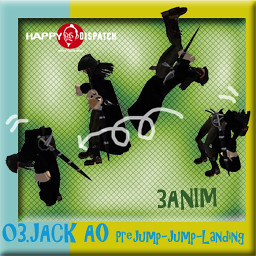
The girly pirate AO 2nd release!
For this time, 3 animations for Pre-jump, jump and landing!
Video
Please keep eyes on the group notice, there will be more to come for this series as group gifts!
This time you don't need gift tickets.
Just come to main shop and touch the board for the group gift.